
Showing posts with label opera. Show all posts
Showing posts with label opera. Show all posts
Feb 6, 2018

Jun 17, 2010
How to download bit-torrent files with Opera
The Opera browser never fails to amaze me - not only it is available for Windows, Mac and Linux - but you it has embedded mail, and can be used to share files (with Opera Unite) but it is also able to download bit-torrent files.
Compared to the traditional download where the file source can only be downloaded from one server - bit-torrent files are sharing the stress of the download on all the clients that are currently downloading the file, making the process a lot more efficient and faster - see illustration for a better understanding (extract from wikipedia) :

Here's a step by step of the process of downloading a bit-torrent DVD (Linuxmint "Isadora")
step 1 - click on the torrent link and press "Open"
step 2 - select destination and press "Yes"
step 3 - check downloading process


Originally posted on Alashazam: How to download a DVD torrent using Opera
Compared to the traditional download where the file source can only be downloaded from one server - bit-torrent files are sharing the stress of the download on all the clients that are currently downloading the file, making the process a lot more efficient and faster - see illustration for a better understanding (extract from wikipedia) :
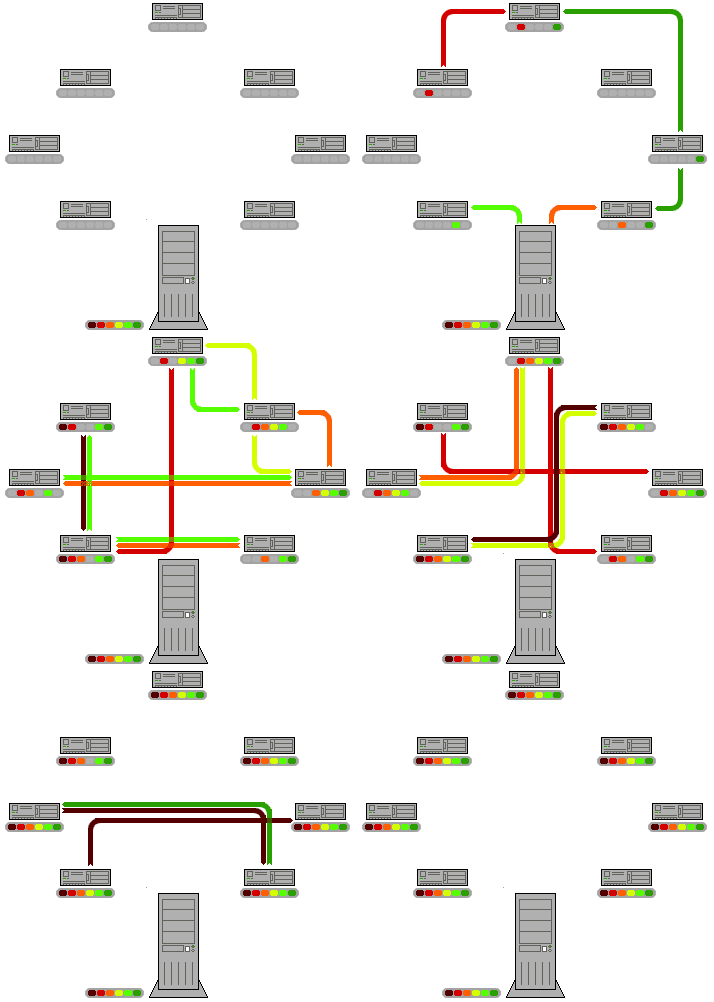
Here's a step by step of the process of downloading a bit-torrent DVD (Linuxmint "Isadora")
step 1 - click on the torrent link and press "Open"
step 2 - select destination and press "Yes"
step 3 - check downloading process


Originally posted on Alashazam: How to download a DVD torrent using Opera
May 15, 2010
Opera, blogger and still the "uploading picture" bug
I just updated my favorite web browser Opera (I was running version 10.10 and now I'm running 10.53) - first impression .... wow, it's a lot faster than before (kudos for that) but I still have this pesky issue when I'm blogging using blogger.com or draft.blogger.com - when I want to add a picture by uploading a new one ... there's simply no "choose file" button - the window looks like that (in blogger.com)

and same issue (with the new uploading feature of draft.blogger.com) the window looks different but same issue - no choose file button - but the bug seems to be known and reported.

and same issue (with the new uploading feature of draft.blogger.com) the window looks different but same issue - no choose file button - but the bug seems to be known and reported.
Aug 18, 2009
Opera: upgrading to Opera 10.0 beta 3
That couldn't have been easier - see pictures below
saved the .deb file - then launch Xfe as root right clicked on the deb file then select "install/upgrade" - and that was it!


Opera: Opera 10.0 beta 3 for Linux changelog
saved the .deb file - then launch Xfe as root right clicked on the deb file then select "install/upgrade" - and that was it!


Opera: Opera 10.0 beta 3 for Linux changelog
Jun 23, 2009
Opera : How to add search engines
Adding search engines - Opera Knowledge Base: "Adding search engines
Opera comes with a default list of commonly used searches, but you can also add additional searches if you do not find your favorite among the defaults. In fact, it does not even have to be a search engine, most sites with a search field can be added as a search.
To add a search, simply right-click (Ctrl-click on Mac) in the site's search field and select 'Create search' from the menu. Enter a name for your search, and a keyword, which can be used for searching directly from the address bar. Then click OK."
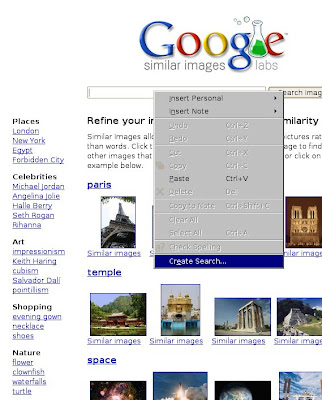
This feature is really cool - and works pretty much as the FireFox "Add a Keyword for this search" (see explanations on mozillaZine website)
But unfortunately this feature is broken (the create search is unactive) in Opera Unite beta see this posts ; hopefully it will be fix in the next release
Opera comes with a default list of commonly used searches, but you can also add additional searches if you do not find your favorite among the defaults. In fact, it does not even have to be a search engine, most sites with a search field can be added as a search.
To add a search, simply right-click (Ctrl-click on Mac) in the site's search field and select 'Create search' from the menu. Enter a name for your search, and a keyword, which can be used for searching directly from the address bar. Then click OK."

This feature is really cool - and works pretty much as the FireFox "Add a Keyword for this search" (see explanations on mozillaZine website)
But unfortunately this feature is broken (the create search is unactive) in Opera Unite beta see this posts ; hopefully it will be fix in the next release
Jun 21, 2009
Installing Opera Unite under Debian
It's not exactly as friendly as the version 9.64 install ; (where everything could be done within synaptic) - but it's quite easy (took me 2 clicks)

And that was it !
- download the .deb file from http://snapshot.opera.com/unix/10-unite/intel-linux/
- launch Xfe as root then click Install/upgrade

And that was it !
Jun 17, 2009
Opera Unite

Opera Unite's slogan of "re-inventing the web", would probably have sound a bit arrogant since very few people have heard of this internet Browser before.
I knew myself a little about Opera 9.5 - because a couple of month ago - I was looking for a browser able to download torrents, and found Wyzo (that didn't really impressed me) and later discovered that handling torrent files has been a standard feature of the Opera browser (for quite some time) and so when I heard about this new beta version I was excited to see what it would be ...
Opera Unite in a nutshell is like sharing your stuff on the web directly from your computer to others.
I've read some critics talking about performance compared to other services, about security issues, about this solution not being environmental friendly since you have to have your PC "on" all day and such ... all these critics make their point, but this Beta is quite exciting.
I can see various scenarios where Opera Unite is really attractive
- I'm chatting with my friend Bobba Fett and we have to transfer a 12MB files - no way to send this by mail, I don't want to upload this on a ftp server etc ... I just launch Opera Unite and share the file - then send the http address of my local opera unite page to Bobba and as soon as the download is finished - I close Opera Unite.
- At home, I want to send a couple of files from my Linux box, on my mac - of course I could start sharing on the mac, setup a ftp service on the Linux box, ... or just launch Opera Unite and already use an interface I'm familiar with.
- I want to setup a "Facebook like account", but I want to have total control of my content
May 13, 2009
Running tiddllyWiki with Opera on Linux platform
In order to run tiddlywiki on Opera you need 2 files the empty.html and the jar file:
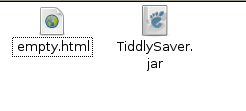
But you also need to have java installed (see Enabling Java in Opera for Linux - Opera Knowledge Base)
if it's not there
and then you need to go into Opera / Tools / Advanced / Content and tick "Enable Java"
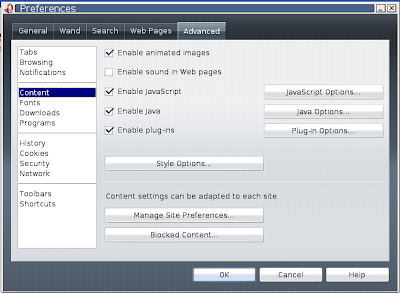
go into "Java option" and put the Java's path
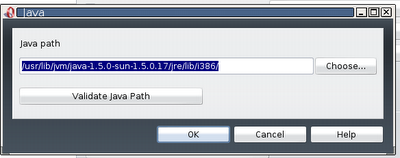
Then you need to quit + relaunch Opera, and load your local tiddlywiki
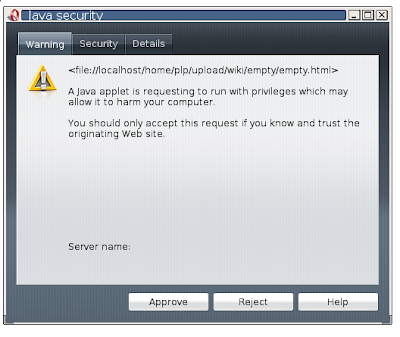
this message will appear just approve it - and it's done

But you also need to have java installed (see Enabling Java in Opera for Linux - Opera Knowledge Base)
sudo find / -name libjava.so /usr/lib/jvm/java-1.5.0-sun-1.5.0.17/jre/lib/i386/libjava.so
if it's not there
sudo apt-get install sun-java5-jre (1.5.0-17-0.1)
and then you need to go into Opera / Tools / Advanced / Content and tick "Enable Java"

go into "Java option" and put the Java's path

Then you need to quit + relaunch Opera, and load your local tiddlywiki

this message will appear just approve it - and it's done
May 6, 2009
Installing Opera Web Browser in Linux Debian

Lately I've tried the Opera web browser and as far as today for me it rocks under Windows - so I tried to install it on Linux Debian ; and went to the opera website, clicked the download link (image below).
But I had second thought since using synaptic "is like shopping on Amazon, with one click purchases" , ... after a bit of searching, I finally found this nice little article in Opera's documentation -
In conclusion actually just add this in the /etc/apt/sources.list
- deb http://deb.opera.com/opera/ stable non-free
- sudo apt-get update
- sudo apt-get install opera
and voila ... you're done with the clean installation of Opera in Debian.
Opera Web Browser | Faster & safer | Download the new Internet browsers free
Subscribe to:
Posts (Atom)
Popular Posts
-
Assuming a table like this: create table test (id integer primary key autoincrement, name text); and values like: insert into test va...
-
 The social media landscape has undergone a significant transformation over the past decade. What began as a platform for free expression an...

